Side Projects and Small Updates

Running stress tests on the x250 before repasting

Hello there again! Just thought I’d give a nearly-mid-month update on things.

While repairing the Thinkpad X250 I’ve been working on recently, I found that two separate replacement keyboards did not have ribbon cables long enough to fully plug in to the connector on the motherboard- this seems to mess with trackpoint functionality. Guess I’ll wait on testing other cable and board replacements on that before coming to a conclusion. Looks like the thermal paste on that core i5 4th gen may also need to be replaced, as it seems the processor hits a solid 99c after only a few seconds of being stress tested, whoa. I intend on giving this to a friend once fully repaired.

I also have a System76 Gazelle model gazp9 that I’m working on getting the body plastics and screen repaired for. Looks like the previous owner I received this from had a habit of punching their screen, so might need an entire display assembly to fix that. This’ll be the extra computer I keep in case a family member ever needs a computer, and are open to trying out Pop!OS. Once I get that guy into functioning order again, I’ll definitely see if I can get an Arch Linux rice as well as a Pop!_OS screenshot from it with inxi and neofetch information.

Looking forward to using my Framework Laptop and a future System76 mobile workstation as my daily drivers in the future. More cores on one machine means I can use one for Virtualization and application compiling for work, with the other being the modular thin and light for everything else. Here’s hoping the JingPad’s software matures as well, as that would be the perfect companion tablet that ran an Ubuntu-based distro. Keep an eye on those project and hardware tracker spreadsheets for when I update em- looking forward to testing some fun hardware soon, as well as next year.

That’s it for this week! I’ll throw some fun things I’ve been reading or watching below recently:

  • Foxes Afloat is a fun youtube channel with a couple who have lived on narrowboats in the UK Canals for a while. I especially like them because I can relate to Colin who is also on the Asperger’s Syndrome train

  • My coworker Nathan Dyer wrote a great blog post about his life hacks for better wrist support, and another one previously about how he’s improved his Bluetooth experience on Linux

  • Watched a fun video on why Tesla made their DOJO computer from a Tesla fan channel

  • Nick from The Linux Experiment channel gave an update on how his JingPad is performing, with updated software.

  • I have a PineTime and PinePower Desktop unit arriving from the fun folks at Pine64 soon, looking forward to seeing how the PineTime can replace my Pebble Time Round. Here’s their october update

  • Jeff Geerling recently reviewed a pre-production board of the Cutie Pi tablet. After running through my emails on my no-longer-used email account I used to have as a main account, it looks like I might be receiving one of those in upcoming months too!

Framework Laptop + eGPU on Fedora Linux

Hi there! I’ve recently taken to moving to a more portable setup, which should allow me to travel more while getting more done.

Still working on finding a decent portable monitor setup that allows the Pangolin pang10 (HDMI-out only) and my Framework Laptop (USB-C out, plus various port expansions) to have a secondary display while traveling. I’ve also been gaming on an eGPU-based setup for the past month and some change with the Framework Laptop.

The External GPU enclosure I’m utilizing is the awesome CoolerMaster EG200 eGPU. This thing includes a 2.5” drive bay on the front, a separate-from-thunderbolt USB hub on the back, and a clean setup for the GPU. Wires are pre-ran from the built-in standard desktop power supply and all the parts are clealy marked, should you need replacements.

The Framework Laptop is still running Fedora Linux. I might try Arch or openSUSE around the beginning of 2022, but we’ll see. I decided to go with an AMD GPU this time around, as I’ve mostly used Intel and NVIDIA products most of my life. Starting with an older RX590 I found on eBay, I tested the GPU for 2-3 weeks and it was running most of my games fine, held back only by the performance of that older card.

Then, all of a sudden, I sprung upon a combo deal on Newegg. Get an AM4 motherboard at MSRP and get an RX6600XT at MSRP as well, as part of the bundle deal! I could likely use that motherboard in a small server build in the future, so I’m keeping that in storage for now, as I use the RX6600XT in the eGPU. Games are running great on the external monitor! While Risk of Rain 2 destroys framerates like it always does, games like Factorio, No Man’s Sky, Audiosurf 2 and Last Epoch are running perfectly fine from 50-140fps!

After receiving the RX6600XT, I used the egpu-switcher app from github to make sure the proper symlinks were setup to offload graphics to that, and grabbed newer mesa drivers via GloriousEggroll’s mesa-aco COPR, and I was good to go! I’ve heard mentions that kernel 5.14.x will allow AMD hotplug support, but it seems that isn’t ready yet, from my testing. Framework has promised a firmware update to their Framework Laptop soon too, that will fix the power delivery anomaly I was seeing. I’d need the eGPU hooked up along with a secondary power supply if I wanted to game for longer than four hours at a time. Once that update comes in, I’ll be able to take that port I’m sacrificing to a power adapter and switch out Expansion Cards to put an Ethernet port in and enjoy faster networking.

For the heck of it, I’ll include recent inxi/neofetch outputs from my docked Framework laptop and Pangolin pang10 laptop below.

## This info was taken from the inxi and neofetch programs on Oct 3 2021 from my Framework. ----------------------------------------------- Graphics: Device-1: Intel TigerLake-LP GT2 [Iris Xe Graphics] driver: i915 v: kernel Device-2: Advanced Micro Devices [AMD/ATI] Navi 23 [Radeon RX 6600/6600 XT/6600M] driver: amdgpu v: kernel Display: x11 server: X.Org 1.20.11 driver: loaded: amdgpu,modesetting resolution: 2560x1440 OpenGL: renderer: AMD DIMGREY_CAVEFISH (DRM 3.42.0 5.14.9-200.fc34.x86_64 LLVM 12.0.1) v: 4.6 Mesa 21.3.0-devel /:-------------:\ :-------------------:: --------------- :-----------/shhOHbmp---:\ OS: Fedora 34 (Workstation Edition) x86_64 /-----------omMMMNNNMMD ---: Host: Laptop A8 :-----------sMMMMNMNMP. ---: Kernel: 5.14.9-200.fc34.x86_64 :-----------:MMMdP------- ---\ Uptime: 4 mins ,------------:MMMd-------- ---: Packages: 2334 (rpm), 17 (flatpak) :------------:MMMd------- .---: Shell: zsh 5.8 :---- oNMMMMMMMMMNho .----: Resolution: 2560x1440 :-- .+shhhMMMmhhy++ .------/ DE: GNOME 40.4 :- -------:MMMd--------------: WM: Mutter :- --------/MMMd-------------; WM Theme: Sweet-Dark :- ------/hMMMy------------: Theme: Sweet-Dark [GTK2/3] :-- :dMNdhhdNMMNo------------; Icons: Nebula [GTK2/3] :---:sdNMMMMNds:------------: Terminal: gnome-terminal :------:://:-------------:: CPU: 11th Gen Intel i7-1185G7 (8) @ 4.800GHz :---------------------:// GPU: AMD ATI Radeon RX 6600/6600 XT/6600M GPU: Intel TigerLake-LP GT2 [Iris Xe Graphics] Memory: 3188MiB / 31880MiB

Outside of working on getting that eGPU setup running fine with the Framework, I’ve also been dabbling in Arch ARM recently and might try installing Parabola, Arch ARM and Ubuntu 21.04 on my Pi 400 recently. We’re also testing out how to “popify” the Ubuntu experience on a Pi 4/400 recently, so stay tuned for that!

Garuda, Mocaccino and some Archcraftian love.

Hi there! Back in action over here in my corner of the world.

I’ve recently been looking into trying a different distro on the GPD Win Max as well as some on my System76 Pangolin. However, I have also recently come across a Pi 400, so I might try turning that into its own little sort of a portable laptop as well. More on that in future blog posts.

With a coworker who enjoys that Arch lifestyle, I decided to try it out as well. However, I’m lazy. Install from scratch? Never for this lazy boyo! I saw a video recently on Archcraft so I’ve been testing it out for a few days on my Pangolin (model pang10)

A screenshot from the tester drive

Above, you’ll see that I’ve been testing Archcraft a tad for work and play. Bpytop is on the right screen (internal display) for monitoring the Pangolin’s temps.

While I’m enjoying using this for work, I’m also testing out our new support topic on our System76 Support page for installing our drivers and some light gaming.

Next, we test Garuda on the GPD Win Max! A few coworkers have been using this distro happily for gaming recently, so I thought I would give it a look.

Garuda on the gpd win max

Here we see Garuda Linux running fine on the GPD Win Max, as it outputs to a 1440p 165hz external monitor…

Veloren on gpd win max

Above we have a screenshot of Veloren, a fantastic FOSS MMORPG game, running at a respectable 36fps on the GPD Win Max. Now, obviously we would see higher framerates if I was playing this on the internal 1280x800 60hz display, but I wanted to see what that 10th gen iGPU was capable of!

In the future, I will have a Framework Laptop, so I’m wondering how well this game will play on Intel’s Xe graphics in the 1185g7 processor I’ll be getting with that.

For now, I’ve settled with Fedora 34 (gnome) on my secondary drive for the Pangolin pang10 laptop, and Garuda Linux on the GPD Win Max as well as the gaming Aero15Xv8 I have. MocaccinoOS is something I’ll possibly delve into next weekend or following ones. For now, Garuda has the best FPS output for that Intel iGPU on the GPD Win Max, and Fedora is the most stable secondary distro for my Pangolin.

Reviving a 2006 Macbook (Part 1)

At this point, I think you know what I mean by reviving.

While in California, I managed to clean this sucker internally and externally, then get 32-bit Debian running on it. Maybe I'll donate it to family or friends after, if anyone has a use for it. Though a good bit older and chunky, I kinda miss this old school style of MacBooks….though I lust over the eventual success of running Arch on an M1 Mac Mini…

The OG boyo

This trusty old sidekick was a free grab from a prior coworker, when I lived and worked back there.

I had prior experience running Debian on it, but perhaps now I’ll see if it can run Void or other lightweight Linux distros. I’m sure Gentoo would be an option, but I’d rather not do something as intensive as installing that from scratch.

Another cool idea would be running Elementary OS, which is slightly mac-themed and runs well under limited hardware, as well as React OS. React OS is a reimplementation of Windows XP/Windows 7 code, but completely rewritten to avoid Microsoft legal action. But enough of this thinking to ourselves, let's get cracking!

Above, you’ll see the install of Debian I had running on the old Macbook booting…but here we run into our first issue. Yes, this Macbook will boot to an external drive, but NOT a modern flash drive. All 32 of my variously-sized flash drives I own are USB 3.1…..none of them are USB 2 or older. It seems that, if the drive is configured to interface in a USB3+ transfer mode by default, we can’t boot to it on the Macbook….time to order a cheapo USB2 drive off ebay and wait for it to arrive.


A few days have passed, and I have obtained said drives.

Now to see if we can get something other than Debian 10 running on here. Maybe Void Linux in 32bit form? I selected that with the LXQt desktop environment, the lightest thing I can imagine running on here.
Burned to a flash drive, inserted…only to find…..

mac2006rip.jpg

Yup, guess we’ll have to burn a DVD or CD drive installer. Time to steal an external dvd drive burner from a family friend!


A few more days have passed and the calls from prospective employers have dropped off, so now to get back to this! It appears I’m still having that “Select CD-ROM Boot Type” issue. According to a youtuber, who has also tried this, I’ll need rEFInd installed on the macbook to be able to boot from external media. So I’ll go reinstall OSX Snow Leopard on this using this script from a Linux machine, and then install rEFInd as this guy has.

macrefind.jpg

As we can see here, I got the rEFInd bootloader installed succesfully on this old boy….but now it isn’t seeing the Lubuntu drive I’ve inserted to the side….
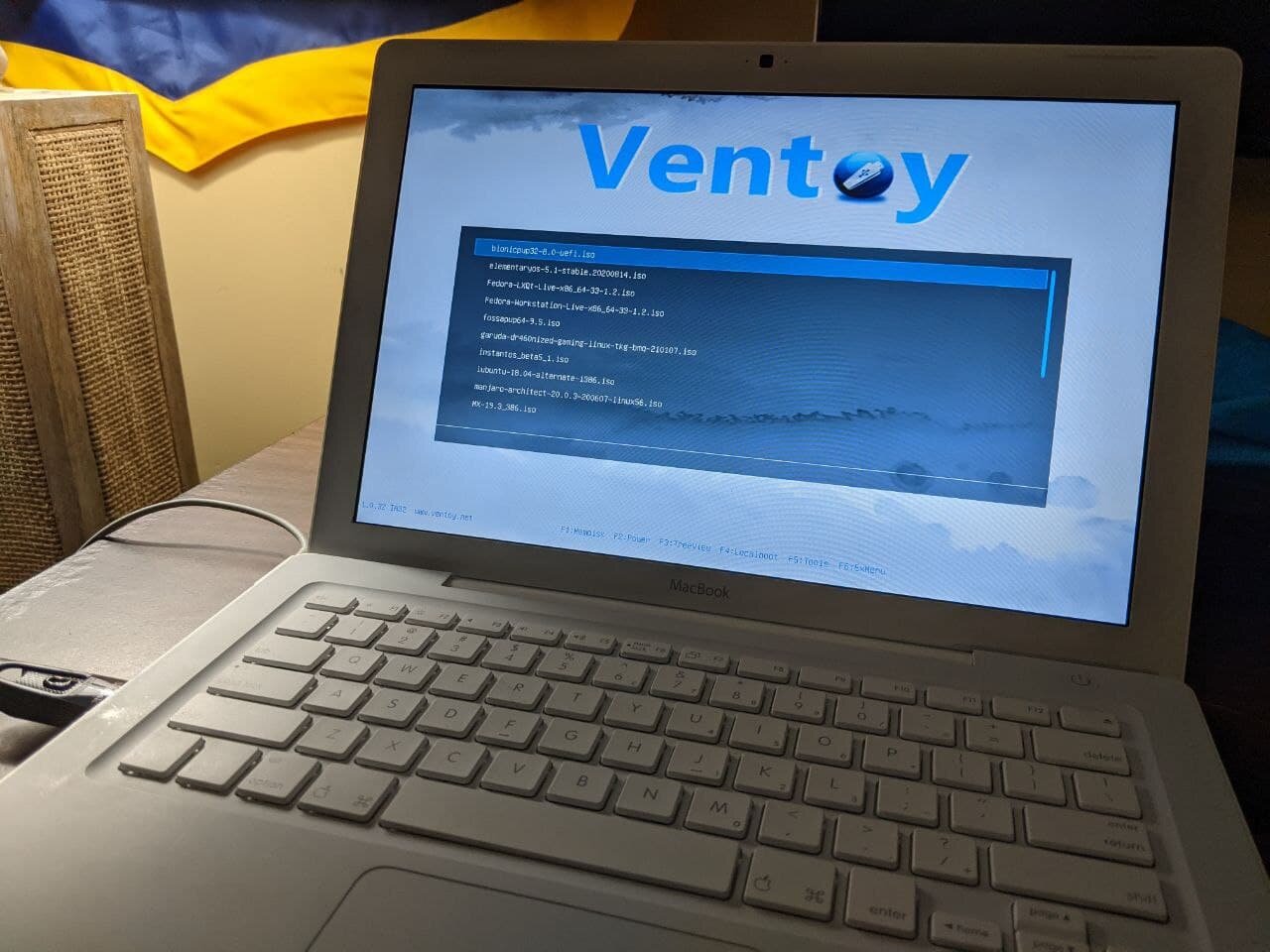
Maybe I’ll try this with my flash drive that utilizes the Ventoy interface to boot many operating systems at once…

macventoy.jpg

Now it looks like we can finally boot to the flash drive with Ventoy and various operating systems on it…however when we try to boot the 32bit versions of Lubuntu, Void or MX Linux…

macboooot.jpg

Well, back to the drawing board, I guess. I’ll see you back here for Part 2 soon.

Medium, PS4 Linux and future projects

Another year, new hope! This is going to be a short update.

piocmetal.jpg

I’ve recently revived my medium account. Say hello to the THICC Pi 4 above!

I’ve recently been working on some things, such as getting PC games running on the Pi 4, which I posted about here, and that Linux-on-PS4 project I blogged about prior. Looking to begin crossing off projects from my tracker this year!

Also recently, I’ve been real excited for the GPD Win 3 release and some upcoming handhelds from Experimental Pi that were leaked.

Maybe I’ll do more writing as well…

Until next time!