The Pi 4 Laptop and C201 Failures

pi4lappi.jpg

Back at it again with the new things to tinker with!

This time I nabbed a Raspberry Pi 4 plus a FLIRC Case and various accessories to see if I could replicate a Pi 4 Lapdock project someone did already. Looks pretty much plug and play….
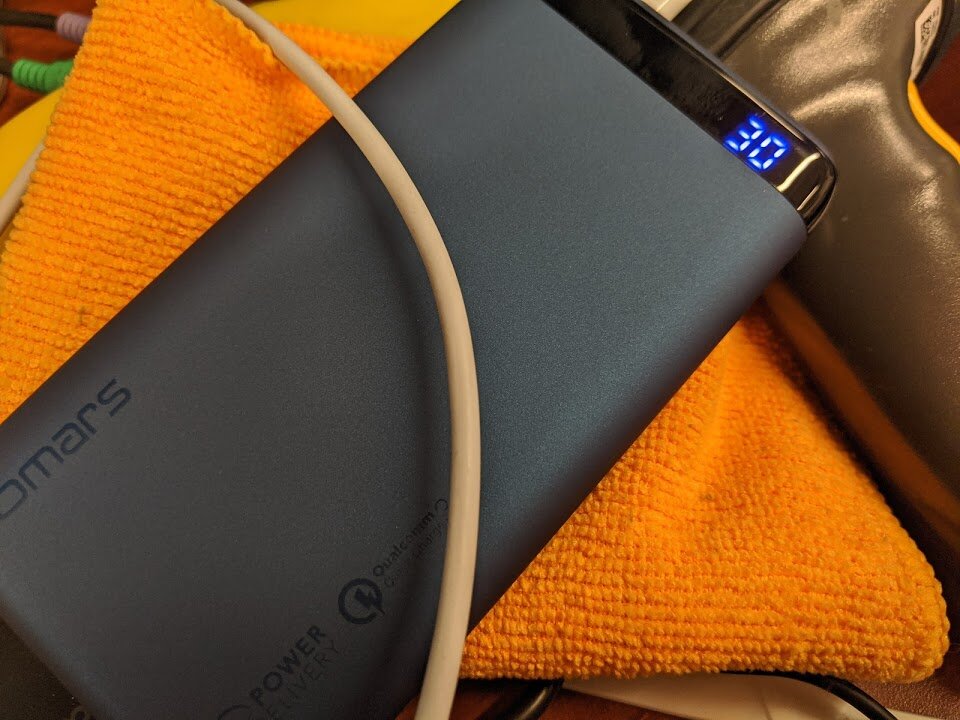
pi4lapbattery.jpg

This Pi 4 laptop was meant to hold me over until the Pinebook Pro December Batch ships out. Here’s a shot of the Omars cheap external battery I’ll be using. This one has Power Delivery through USB-C so I know for sure it can power the Pi 4.

pi4laplapdockwithpi.jpg

Here’s a shot of the Pi 4 in its case on top of the Motorola Lapdock I grabbed for super cheap on eBay.

The Lapdock was once used as a docking station of sorts for the failed Motorola Atrix phone project from Motorola. Fear not, my friends! It lives on through projects!

pi4lapconnections2.jpg

With the proper connectors (linked above when I mentioned the Pi 4 Lapdock project) you can easily plug in the Pi 4, though this more powerful unit needs power from an external battery due to the improvements over the prior model. The good news is that we’ll be going straight from Micro-HDMI to Micro-HDMI so you likely won’t need an adapter!

pi4lapconnections3.jpg

After plugging up the connections, and later on powering up the Pi 4……I realize I ended up losing the power adapter for the Motorola Lapdock D: so it looks like I’ll be waiting a while for a replacement to arrive.

…….however…

c201internals.jpg

I took apart a replacement ASUS C201 Chromebook I found on eBay and removed the write-protect screw again…but forgot to plug the trackpad in before I left for home….we’ll see if we can properly enable Developer Mode on this next time and see if we can Libreboot it!

Progress on Librebooted T400 with Advanced Dock 2503

Hello there again!

I had to ditch my permanently-managed Chromebook C201 for a replacement, since there seemed there was nothing I could do. The replacement was $20 and it looks like I’ll actually be able to Libreboot that one!

In other news, I’ll be spinning up a Linode droplet soon to see if I can host a Joplin instance and connect to it with my phones. I also have made progress on the T400 project.

t400librebootquick.jpg

After failing to flash Libreboot roms to the hardware various times, as well as physically damaging another W500 by overextending the motherboard, I ended up buying a pre-Librebooted unit from a friend, with the Atheros wifi card installed, so I wouldn’t have to worry about it.

Regarding getting the Advanced Dock 2503 working….it seems a bit hit or miss now

t400mxinstall.jpg

I’ll detail more in the dedicated page for it, but MX Linux was installed and I succesfully got it booted up, but some other problems have come up….

More info on the status of my 2019 projects, here. (also in Projects dropdown “Progress”)

I also posted on a forum my status of this project, here.

I’ll also be receiving a Librem 5 and a Pinebook Pro either by the end of this year, or sometime early next year! Hope you enjoyed this update. Peace!

T400 LB update and Pixelbook Ubuntu idea

Why hello there again!

Some small updates. I’ll eventually post more about the T400 project, as well as link some source and other places I’ve been posting about it. Currently struggling with getting Libreboot to play nicely with an 8GB RAM upgrade, but I’ll likely be running MX Linux on it with NVIDIA drivers to get the Advanced Dock 2503 properly working with some of the cards we have sitting around at work.

Something else I saw recently was that someone got Ubuntu properly working on a Google Pixelbook with some additions from the ChromeOS kernel and some custom scripts to get the backlight keys etc working well. That’d be interesting to try as a daily driver for work, since mostly everyone in our office currently uses Macbooks. As long as I can access a terminal and a web browser, I’d be fine at work…without Google selling my data.

Another thing I saw recently is that Google may be adding support for ePrivacy screens to chromebooks.

That’s all for now! Will report back when I have more to say about the state of the Librebooted T400 and if I ever get the G Suite management off the ASUS C201.

(There are links on the different-colored words in all of my blog posts)

Learning How To Libreboot The C201

Hello there again!

Recently I’ve been working on two projects; working on Librebooting a T400 and W500, as well as Librebooting a spare ASUS C201 Chromebook.

Also working on learning C when I get some free time recently, after reinstalling Arch on my T440p. Fedora Silverblue is really cool and incredibly stable! However, for tinkering more, the ostree system kind of compartmentalizes things using the Toolbox and various other commands. For native installs of applications, I’d need a non-ostree OS again.

I’ve actually not installed Arch from scratch in about two years now, so it will likely be an interesting experience again. Regarding Librebooting the C201, it seems that the device that I got for cheap is stuck under management and won’t allow booting into Developer Mode, so I may actually have to use my CH341A chip to flash it externally. I’ll be looking into the Libreboot documentation for this.

Below is an image of where I removed the write-protect screw on the C201, for a thumbnail.

c201screw.jpg

Once I get either Debian ARM or Parabola installed on the C201, I can start tinkering more with looking into how ARM architecture works. I need to learn C more too! There’s no point in knowing tons about libre software if I can’t modify the code :)

Some other things I’ve seen recently:

Mo Distros, Mo NVIDIA Problems

Today I tried out MX Linux on the Gigabyte Aero15Xv8. More info on that here. Didn't work out too well and I ended up crashing and burning, only to install Pop!_OS over that again. Sadness. I won’t give up though…
This is why we need a full-AMD gaming laptop on the market, for the Linux faithful.

Also began more work on learning the ins and outs of Alpine Linux. I went to a hackerspace recently called Noisebridge in SF. I used to frequent the place quite often last year, but now is my first time heading there since returning to the land of tech. Learned a bit more that there was a version of Alpine with Xen already preinstalled and we tried it out on an i3 board in the hackerspace, only to realize that it still uses a ridiculously low amount of resources. May or may not have an update on where that project goes this upcoming Friday, when I head there with a friend. It seems my adventures with it in the cloud are finished for now- see the PROGRESS tab under the Projects dropdown at top of site- but I might try it on a Raspberry Pi 4 in the future! As for my build regarding the Asrock Deskmini A300 board and chassis, I'll probably be running Fedora Server on that guy with various flatpaks, as well as retroarch.

Up next, I libreboot a Macbook from 2006….once I get a proper medium to boot Debian from, since it won’t take any of my USB3.0/3.1 flash drives.

I’m getting back to work on my LARBS-in-the-cloud project as well as slowly saving up to order the parts for my little Nextcloud/gaming AMD box soon too. Will probably end up making a full on blog post about the LARBS thing when I finally get it working on the nanode. I don’t think that customized Arch install will ever be as light as Alpine though… Till then, guten nacht!